
Connect-AzAccount
# Prepare results array and output path
$results = @()
$outputFile = “C:\Temp\AzureRoleAssignments_Combined.csv”
if (Test-Path $outputFile) { Remove-Item $outputFile }
# Loop through subscriptions
$subscriptions = Get-AzSubscription
foreach ($subscription in $subscriptions) {
Write-Host “Processing subscription: $($subscription.Name)”
Set-AzContext -SubscriptionId $subscription.Id
# — Permanent Assignments —
$permanentAssignments = Get-AzRoleAssignment
foreach ($assignment in $permanentAssignments) {
$scope = $assignment.Scope
$isOwner = $assignment.RoleDefinitionName -eq “Owner”
$accessLevel = if ($scope -like “*providers/*”) {
“Resource”
} elseif ($scope -like “*resourceGroups/*”) {
“Resource Group”
} elseif ($scope -like “/subscriptions/*”) {
“Subscription”
} else {
“Unknown”
}
$results += [PSCustomObject]@{
SubscriptionName = $subscription.Name
SubscriptionID = $subscription.Id
UserName = $assignment.DisplayName
UserPrincipalName = $assignment.SignInName
Role = $assignment.RoleDefinitionName
AssignmentType = “Permanent”
StartTime = “N/A”
EndTime = “N/A”
IsSubscriptionOwner = $isOwner
AccessLevel = $accessLevel
Scope = $scope
}
}
# — PIM Eligible Assignments —
$pimEligible = Get-AzRoleEligibilityScheduleRequest -Scope “/subscriptions/$($subscription.Id)” -Filter “status eq ‘Provisioned’”
foreach ($pim in $pimEligible) {
try {
$roleDefinitionId = ($pim.RoleDefinitionId -split “/”)[-1]
$roleDefinition = Get-AzRoleDefinition -Id $roleDefinitionId
$user = Get-AzADUser -ObjectId $pim.PrincipalId
$isOwner = $roleDefinition.Name -eq “Owner”
$results += [PSCustomObject]@{
SubscriptionName = $subscription.Name
SubscriptionID = $subscription.Id
UserName = $user.DisplayName
UserPrincipalName = $user.UserPrincipalName
Role = $roleDefinition.Name
AssignmentType = “PIM Eligible”
StartTime = $pim.ScheduleInfo.StartDateTime
EndTime = $pim.ScheduleInfo.Expiration.EndDateTime
IsSubscriptionOwner = $isOwner
AccessLevel = “Subscription” # PIM assignments are scoped at subscription level
Scope = $pim.Scope
}
} catch {
Write-Warning “Could not retrieve role definition or user details for PIM eligible assignment. Error: $($_.Exception.Message)”
}
}
# — PIM Elevated Assignments —
$pimElevatedAssignments = Get-AzRoleAssignment | Where-Object {
$_.ConditionVersion -ne $null -or $_.Conditions -ne $null
}
foreach ($elevated in $pimElevatedAssignments) {
$scope = $elevated.Scope
$isOwner = $elevated.RoleDefinitionName -eq “Owner”
$accessLevel = if ($scope -like “*providers/*”) {
“Resource”
} elseif ($scope -like “*resourceGroups/*”) {
“Resource Group”
} elseif ($scope -like “/subscriptions/*”) {
“Subscription”
} else {
“Unknown”
}
$results += [PSCustomObject]@{
SubscriptionName = $subscription.Name
SubscriptionID = $subscription.Id
UserName = $elevated.DisplayName
UserPrincipalName = $elevated.SignInName
Role = $elevated.RoleDefinitionName
AssignmentType = “PIM Elevated”
StartTime = “N/A”
EndTime = “N/A”
IsSubscriptionOwner = $isOwner
AccessLevel = $accessLevel
Scope = $scope
}
}
}
# Export to CSV
$results | Export-Csv -Path $outputFile -NoTypeInformation
Write-Host “Export complete. The CSV file is located at: $outputFile”
Breakdown:
# Connect to Azure
This script collects Azure role assignments across all subscriptions in a tenant, including:
- Permanent role assignments
- PIM (Privileged Identity Management) eligible assignments
- PIM elevated (active) assignments
It then exports the combined data to a CSV file for auditing or reporting purposes.
🧩 Step-by-Step Breakdown
1. Connect to Azure
Prompts the user to authenticate to Azure.
2. Prepare Output
Initializes an empty array to store results and removes any existing output file.
3. Loop Through Subscriptions
Iterates through each subscription in the tenant.
4. Permanent Role Assignments
Fetches all permanent role assignments in the current subscription.
For each assignment:
- Determines the scope (Resource, Resource Group, Subscription)
- Checks if the role is Owner
- Adds the data to $results with “AssignmentType” = “Permanent”
5. PIM Eligible Assignments
Fetches users who are eligible for roles via PIM but haven’t activated them.
For each eligible assignment:
- Retrieves role definition and user details
- Adds the data to $results with “AssignmentType” = “PIM Eligible”
6. PIM Elevated Assignments
Filters role assignments that are active PIM elevations (temporary access).
For each elevated assignment:
- Determines scope and owner status
- Adds the data to $results with “AssignmentType” = “PIM Elevated”
7. Export to CSV
Exports the collected data to a CSV file.
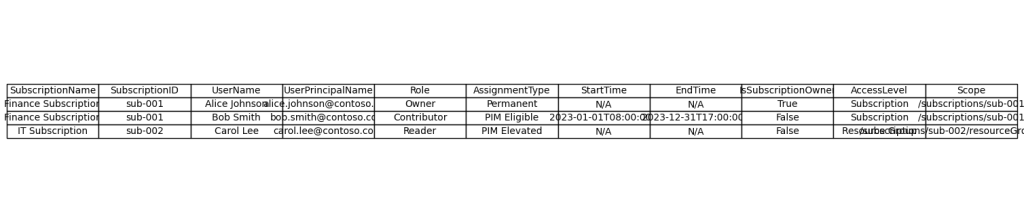
📁 Output
- File: C:\Temp\AzureRoleAssignments_Combined.csv
- Contains: Subscription name, user info, role, assignment type, scope, access level, etc.
 onelinecommand
Leave a comment